Categories
Modern JavaScript

Best of Modern JavaScript — Array Fill, Concat, and Spread

Since 2015, JavaScript has improved immensely.

It’s much more pleasant to use it now than ever.

In this article, we’ll look at various array operations.

Creating Arrays Filled with Values

We can create an array filled with values with the Array.prototype.fill method.

It replaces all array elements including holes with a fixed value.

For instance, we can write:

const arr = new Array(3).fill('foo');

Then arr is [“foo”, “foo”, “foo”] .

new Array(3) creates an array with 3 holes and fill replaces each hole with 'foo' .

We can fill an array with ascending numbers by calling the keys method with an empty array.

For example, we can write:

const arr = [...new Array(10).keys()]

Then arr is [0, 1, 2, 3, 4, 5, 6, 7, 8, 9] .

We can also fill an array with some computed value.

To do that, we can use the Array.from method.

For instance, we write:

const arr = Array.from(new Array(10), (x, i) => i ** 2)

then we return an array with the first 10 square numbers.

So arr is [0, 1, 4, 9, 16, 25, 36, 49, 64, 81] .

To fill an array with onlyundefined , we can spread an array created with the Array constructor.

For example, we can write:

const arr = [...new Array(10)];

Then arr is:

[undefined, undefined, undefined, undefined, undefined, undefined, undefined, undefined, undefined, undefined]

Configuring Which Objects are Spread by concat()

We can configure which objects are spreadable by the Array.prototype.concat method.

To do this, we can override the Symbol.isConcatSpreadable value.

By default, the Array.prototype.concat method spread an array into the array it’s called on.

For instance, we can use it by writing:

const arr = [3, 4, 5];
const merged = [1, 2].concat(arr, 6);

Then merged is [1, 2, 3, 4, 5, 6] .

We pass in an array or a value into the method and it’ll be spread into the array it’s called on and returned.

To change how concatenation is done, we can define our own Symbol.isConcatSpreadable value to let change this behavior.

We can write:

const arr = [3, 4, 5];
arr[Symbol.isConcatSpreadable] = false;

const merged = [1, 2].concat(arr, 6);

Then merged is:

[
  1,
  2,
  [
    3,
    4,
    5
  ],
  6
]

No Spreading for Non-Arrays

Non-array values won’t be spread into the array that concat is called with.

However, we can change this behavior with the Symbol.isConcatSoreadabke value.

For instance, we can spread an array-like object into the array that we return with concat by writing:

const arrayLike = {
  length: 2,
  0: 'c',
  1: 'd'
};
arrayLike[Symbol.isConcatSpreadable] = true;

const merged = Array.prototype.concat.call(['a', 'b'], arrayLike, 'e', 'f');

We set arrayLike[Symbol.isConcatSpreadable] to true so that we can spread the properties with integer indexes into the array returned by Array.prototype.concat .

Therefore, we get that value of merged is:

[
  "a",
  "b",
  "c",
  "d",
  "e",
  "f"
]

Detecting Arrays

Array.prototype.concat detects an array the same way as Array.isArray .

It doesn’t matter whether Array.prototype is in the prototype chain.

This ensures that various hacks that were used to create Array subclasses still work with the array check.

Conclusion

We can fill and combine arrays to manipulate arrays.

The Symbol.isConcatSpreadable property lets us set if an array is spreadable into another array.

Categories
Modern JavaScript

Best of Modern JavaScript — Well-Known Symbols

Since 2015, JavaScript has improved immensely.

It’s much more pleasant to use it now than ever.

In this article, we’ll look at new OOP features in JavaScript.

How to use __proto__?

To get the prototype of an object, we use Object.getPrototypeOf .

To create an object with a given prototype, we can use Object.create .

Object.setPrototypeOf is deprecate and it prevents optimizations in many browsers.

__proto__ can be used to get and set the prototype of an object.

Enumerability

The for-in loop traverses the string keys of an own and inherited enumerable properties.

Object.keys returns the string keys of an enumerable own properties.

JSON.stringify only stringified enumerable own properties and string keys.

In ES6, Object.assign only copies enumerable own string and symbol properties.

There’re many non-enumerable properties in a JavaScript object.

All prototype properties of built-in classes are non-enumerable.

For instance, if we have:

const desc = Object.getOwnPropertyDescriptor.bind(Array);
console.log(desc(Object.prototype, 'toString').enumerable)

We get the property descriptors in the Array.prototype.toString method.

And we get the enumerable property, and it’ll log false .

Marking Properties as not to be Copied

We can mark a property not to be copied if we mark the property as being enumerable.

For instance, we can write:

const obj = Object.defineProperty({}, 'foo', {
  value: 'bar',
  enumerable: false
});

We set the enumerable property to false so that it won’t be picked up by Object.assign or the spread operator.

**Object.assign()**

Object.assign can be used to merge object sources into the target.

All own enumerable properties from the sources will be copied to the target.

It doesn’t consider inherited properties.

Hiding Own Properties from JSON.stringify()

Hiding own properties from JSON.stringify can be done by making properties non-enumerable.

This will make JSON.stringify skip the properties.

We can also specify the toJSON method to return the object we want to stringify.

For example, we can write:

const obj = {
  foo: 'bar',
  toJSON() {
    return {
      bar: 'baz'
    };
  },
};

console.log(JSON.stringify(obj))

Then the console log will log {“bar”:”baz”} .

Customizing Basic Language Operations via Well-Known Symbols

We can customize basic language operations with well-known symbols.

The Symbol.hasInstance method lets an object customize the behavior of the instanceof operator.

Symbol.toPrimitive is a method that lets us customize how it’s converted to a primitive value.

The Symbol.toStringTag method lets us call Object.prototype.toString to compute the string description of an object.

Symbol.unscopables lets us hide some properties from the with statement.

obj instanceof C works by doing some checks.

If C isn’t an object, then it throws a TypeError .

If the method exists, then it calls C[Symbol.hasInstance](obj) .

It coerces the result to boolean and returns it.

Otherwise, it computes and returns the result according to the regular algorithm by checking for scalability, C.prototype in the prototype chain of obj , etc.

The only method in the standard library that has Symbol.hasInstance is Function.prototype .

We can check whether a value in an object by writing:

const ObjType = {
  [Symbol.hasInstance](value) {
    return (value !== null &&
      (typeof value === 'object' ||
        typeof value === 'function'));
  }
};

We create our own ObjType object with the Symbol.hasInstance method.

It takes the value we want to check.

Then it checks whether it’s not bull , the type of value is 'object' or 'function' .

Then we can use it by writing:

{} instanceof ObjType

which returns true .

Conclusion

Enumerabnility of objects can be changed and checked.

Also, we can change the behavior or instanceof and other operators by overriding methods with well-known symbols.

Categories
Modern JavaScript

Best of Modern JavaScript — Symbols and Base Classes

Since 2015, JavaScript has improved immensely.

It’s much more pleasant to use it now than ever.

In this article, we’ll look at new OOP features in JavaScript.

Symbol.toPrimitive Method

The Symbol.toPrimitive lets an object customize how it’s converted to a pritmive value.

Many JavaScript operators coverts operands.

For instance, the multiplication operator converts operands to numbers.

The Date constructor converts parameters to numbers.

parseInt also does the same conversion.

The most common kind of values is converted to boolean, number, string, or object.

Numbers and string conversions are converted by the ToPrimitive operation.

There’re other methods used for coercion.

They include the obj.valueOf method to convert it primitive wrapper object to a primitive value.

To convert strings, the obj.toString method is returned if it’s primitive.

valueOf is called as an alternative.

The default mode is to convert to a number.

Date.prototype[Symbol.toPrimitive] deviates from the default algorithm for conversion.

It converts the Date instance to a timestamp.

For instance, we can override the Symbol.toPrimitive method by writing:

const obj = {
  [Symbol.toPrimitive](hint) {
    switch (hint) {
      case 'number':
        return 100;
      case 'string':
        return 'foo';
      case 'default':
        return 'default';
      default:
        throw new Error();
    }
  }
};

The hint has the string with the mode for conversion.

And we can return what we want based on that.

Symbol.toStringTag

The Symbol.toStringTag is a string-valued property that’s used to create the default string description of an object.

It’s used internally by the Object.prototype.toString method.

For instance, we can create our own description by writing:

class Foo {
  get[Symbol.toStringTag]() {
    return 'bar';
  }
}

Then when we call:

console.log(Object.prototype.toString.call(new Foo()));

Then we get:

'[object bar]'

logged.

The default return values for Symbol.toStringTag for various kinds of objects are the following:

  • undefined' — Undefined'
  • null — 'Null'
  • array — 'Array'
  • string — 'String'
  • arguments — 'Arguments'
  • something callable — 'Function'
  • error object — 'Error'
  • boolean object — 'Boolean'
  • number object — 'Number'
  • date object — 'Date'
  • regular expression object — 'RegExp'
  • everything else — 'Object'

Overriding the Default toString Tag

We can override the default toString tag by overriding the Symbo.toStringTag method with our own method.

Built-in classes also have their own string tags.

Objects like JSON , Math , ArrayBuffer , DataView , Map , Promise , Set , TypedArray , WeakMap , WeakSet , etc. all have their own string tags.

The Symbol.toStringTag methods are all non-writable, non-enumerable, but it’s configurable.

Symbol.unscopables

Symbol.unscopables lets an object hide some properties from the with statement.

It’s only used by the Array.prototype in the standard library.

We shouldn’t use the with statement, so we don’t have to worry about this.

Base Classes

Class syntax is introduced with ES6 to let us create constructors easier.

For instance, we can write:

class Person {
  constructor(name) {
    this.name = name;
  }

  toString() {
    return `(${this.name})`;
  }
}

We can then create the object from it by writing:

const person = new Person('james');

And we can call the toString method by writing:

person.toString()

and get 'james' .

If we check the type of the class with typeof :

typeof Person

We get 'function' .

However, if we try to call it as a function, we can write:

Person()

We’ll get the error ‘TypeError: Classes can’t be function-called’.

Conclusion

We can override common well-known symbols to change the behavior of objects.

Also, we can use the class syntax to create constructors.

Categories
Modern JavaScript

Best of Modern JavaScript — Super Calls and Private Variables

Since 2015, JavaScript has improved immensely.

It’s much more pleasant to use it now than ever.

In this article, we’ll look at how to define classes with JavaScript.

Superconstructor Calls

We’ve to call super before we call anything else.

For example, we can’t write:

class Foo {}

class Bar extends Foo {
  constructor(foo) {
    this.foo = foo;
    super();
    this.bar = bar;
  }
}

The first line must be the super call.

Instead, we write:

class Foo {}

class Bar extends Foo {
  constructor(foo) {
    super();
    this.foo = foo;
    this.bar = bar;
  }
}

Removing the super call also gives us an error. So we can’t write:

class Foo {}

class Bar extends Foo {
  constructor() {}
}

Overriding the Result of a Constructor

We can override the result of a constructor by returning something we want in the constructor .

For example, we can write:

class Foo {
  constructor() {
    return {};
  }
}

Then when we log:

console.log(new Foo() instanceof Foo);

We get false returned.

It doesn’t matter whether this is initialized or not since we’re returning an object instead returning this implicitly in our constructor.

We don’t have to call super in the child constructor if we override the result as we did in the example.

Default Constructors for Classes

We don’t need to specify an empty constructor if we don’t put anything in there.

So if we have:

`constructor()` `{}`

we can remove it.

For derived classes, we don’t need to add a constructor just to call the super constructor.

So we don’t have to write:

constructor(...args) {
  super(...args);
}

in our code.

Subclassing Built-in Constructors

We can create subclasses of built-in constructors.

For example, we can write:

class SomeError extends Error {}
throw new SomeError('error');

We create a subclass of Error with the extends keyword.

Then we can throw it like any other Error instance.

We can also create subclasses of the Array constructor.

For example, we can write:

class Stack extends Array {
  get first() {
    return this[0];
  }
}

Then we can create a new Stack instance and use the available Array properties:

class Stack extends Array {
  get first() {
    return this[0];
  }
}

const stack = new Stack();
stack.push('foo');
stack.push('bar');
console.log(stack.first);
console.log(stack.length);

We called pusg to push entries to our Stack instance.

Then we get the first and length properties.

first is the getter we defined.

And length is inherited from Array .

Private Data for Classes

JavaScript classes have no private members.

If we want private data, then we’ve to hide them somewhere else.

Or we can just create public members with a special naming scheme to indicate that they’re private.

We can just add an underscore before the property to indicate that they’re private.

For example, we can write;

class Foo {
  constructor() {
    this._count = 0;
  }
}

we add the this._count instance property to indicate that count is private.

We can also store private properties with weak maps and symbols.

For instance, we can write:

const _count = new WeakMap();

class Counter {
  constructor(count) {
    _count.set(this, count);
  }

  increment() {
    let count = _count.get(this);
    count++;
    _count.set(this, count);
  }
}

We create 2 weak maps and use this as the key for both weak maps.

The values are set to what we pass into the constructor.

Then we can get the value with the weak map’s get method.

And set the value with the set method.

Weak maps are useful since we can access the values with this , preventing the items inside from being accessed any other way.

Conclusion

There are several things we’ve to look at when we call super .

Also, there are no easy ways to keep variables private.

Categories
Vue 3

Vue 3 — Vue Instance Properties and Templates

Vue 3 is in beta and it’s subject to change.

Vue 3 is the up and coming version of Vue front end framework.

It builds on the popularity and ease of use of Vue 2.

In this article, we’ll look at Vue instance hooks and create simple templates with Vue 3.

Vue Instance Properties

The Vue instance has some properties that are built into th app.

The $data property has the data that our Vue instance has.

For instance, we can write:

<!DOCTYPE html>
<html lang="en">
  <head>
    <title>App</title>
    <script src="https://unpkg.com/vue@next"></script>
  </head>
  <body>
    <div id="app">
      {{a}}
    </div>
    <script>
      const data = { a: 1 };

      const vm = Vue.createApp({
        data() {
          return data;
        }
      }).mount("#app");

      console.log(vm.$data.a);
    </script>
  </body>
</html>

We have the vm.$data.a property which is the same as what we return in the data method.

a would be 1.

Instance Lifecycle Hooks

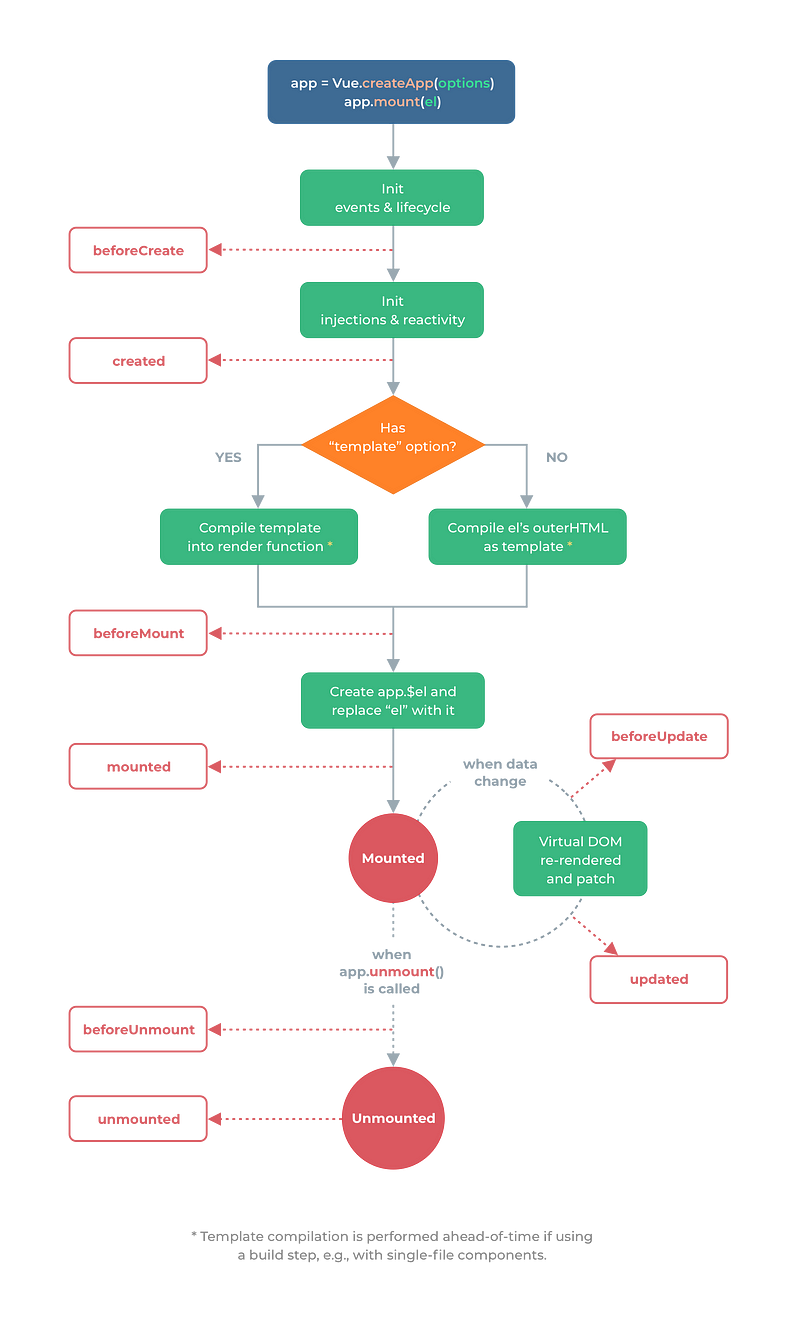
A Vue instance has various lifecycle hooks that it goes through from the initial load to being destroyed.

The following is the lifecycle diagram:

Courtesy of https://v3.vuejs.org/guide/instance.html#lifecycle-diagram

When the Vue instance is created, it starts with the init events and lifecycle stage, which calls the beforeCreate method in the Vue instance.

Event listeners are attached and the lifecycle begins at this stage.

Then it initializes the injections and reactivity stage and calls the created method.

This stage is where Vue starts listening for changes for data changes in the Vue instance.

Then one of 2 things can happen depending on if there’s a template in our Vue instance.

If there is, then template is compiled.

Otherwise, it compiles the content of the element we mounted pour Vue instance to HTML.

Once either of those is done, then beforeMount method is run.

Then the $el property is added to the Vue instance. Then element’s content is replaced with the compiled content.

The mounted method is then run.

When the state changes, then beforeUpdate is run.

Once the Virtual DOM is updated, the updated method is run.

Once app.unmount is called, which means the component will be unmounted.

Then beforeUnmount is run.

And when it’s unmounted, the unmounted method is run.

The methods are optional in our component.

We only need to add them if we want to run something in those lifecycle stages.

For example, we can write:

<!DOCTYPE html>
<html lang="en">
  <head>
    <title>App</title>
    <script src="https://unpkg.com/vue@next"></script>
  </head>
  <body>
    <div id="app">
      {{a}}
    </div>
    <script>
      const vm = Vue.createApp({
        data() {
          return {
            a: 1
          };
        },
        created() {
          console.log(this.a);
        }
      }).mount("#app");
    </script>
  </body>
</html>

to add our own code to the created hook, which runs when the component first listen to state changes.

Therefore, this.a ‘s value will be logged.

Template Syntax

Vue uses a HTML-base template syntax that lets us bind the value between the template and the Vue instance’s data.

Vue compiles the templates into Virtual DOM render functions.

This lets Vue figure out the least amount of changes to change the real DOM to render the latest data.

Interpolations

The most basic kind of data binding is text interpolation.

For example, we can write:

<!DOCTYPE html>
<html lang="en">
  <head>
    <title>App</title>
    <script src="https://unpkg.com/vue@next"></script>
  </head>
  <body>
    <div id="app">
      {{a}}
    </div>
    <script>
      const vm = Vue.createApp({
        data() {
          return {
            a: 1
          };
        }
      }).mount("#app");
    </script>
  </body>
</html>

Then we see that a is 1, which is displayed on the screen.

This interpolate is updated every time a changes.

We can make the interpolation only update once with the v-once directive.

For instance, we can write:

<!DOCTYPE html>
<html lang="en">
  <head>
    <title>App</title>
    <script src="https://unpkg.com/vue@next"></script>
  </head>
  <body>
    <div id="app">
      <div v-once>{{a}}</div>
    </div>
    <script>
      const vm = Vue.createApp({
        data() {
          return {
            a: 1
          };
        }
      }).mount("#app");
    </script>
  </body>
</html>

{{a}} will still be displayed as 1 even if the value changes.

Conclusion

The Vue instance has its own lifecycle hook.

We can add the code needed to run code during various stages of a Vue instance lifecycle.

Vue has an easy to use template syntax for rendering data.